
Every channel in one place.
Every video from a template that works.
Funmodio is a desktop video studio for people who publish a lot. Keep one workspace per channel, brand or client, and start each video from a ready-made recipe in the Store instead of a blank prompt.
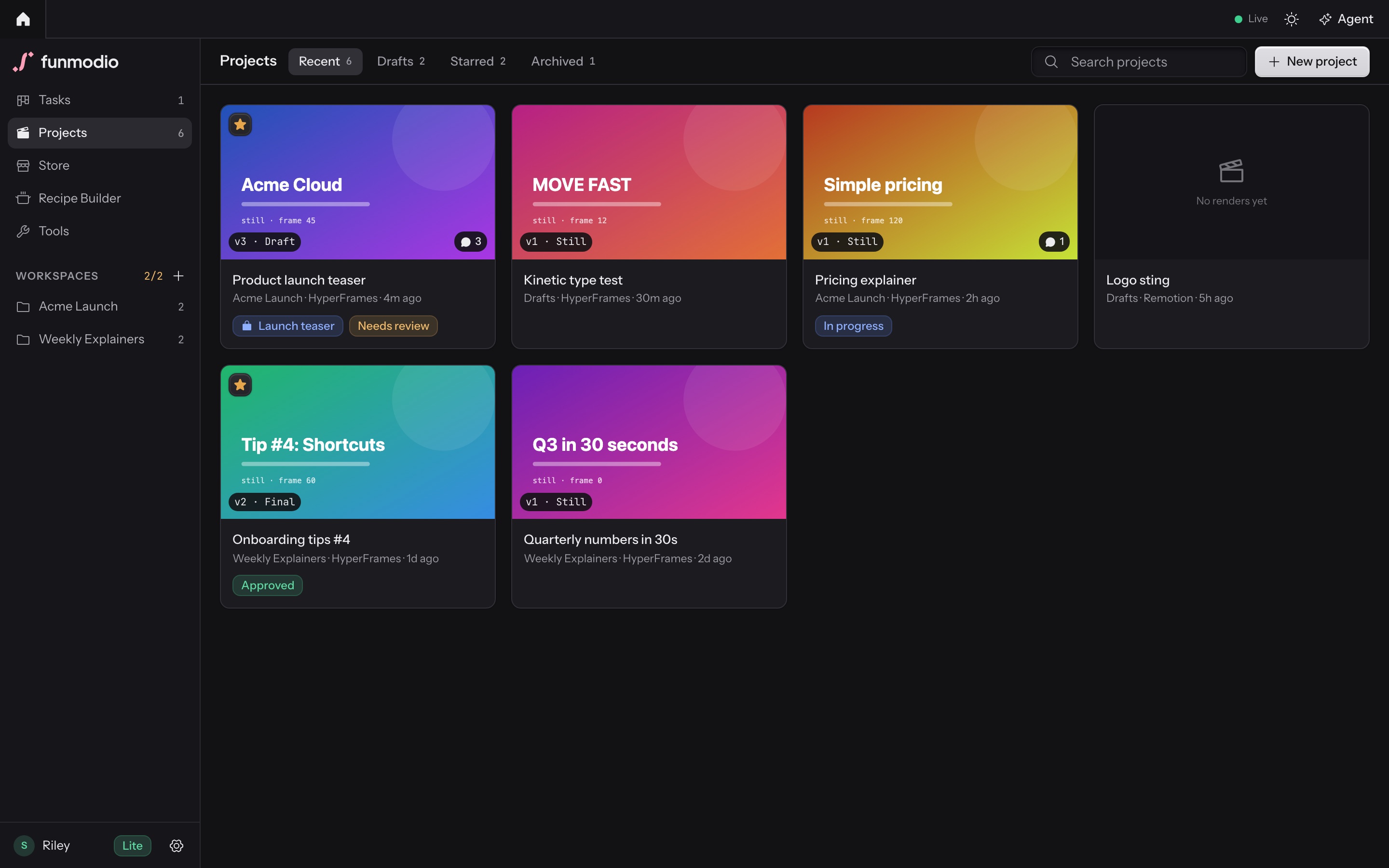
- One workspace per channel, brand or client, each with its own projects.
- Every project shows its workspace and the engine that renders it.
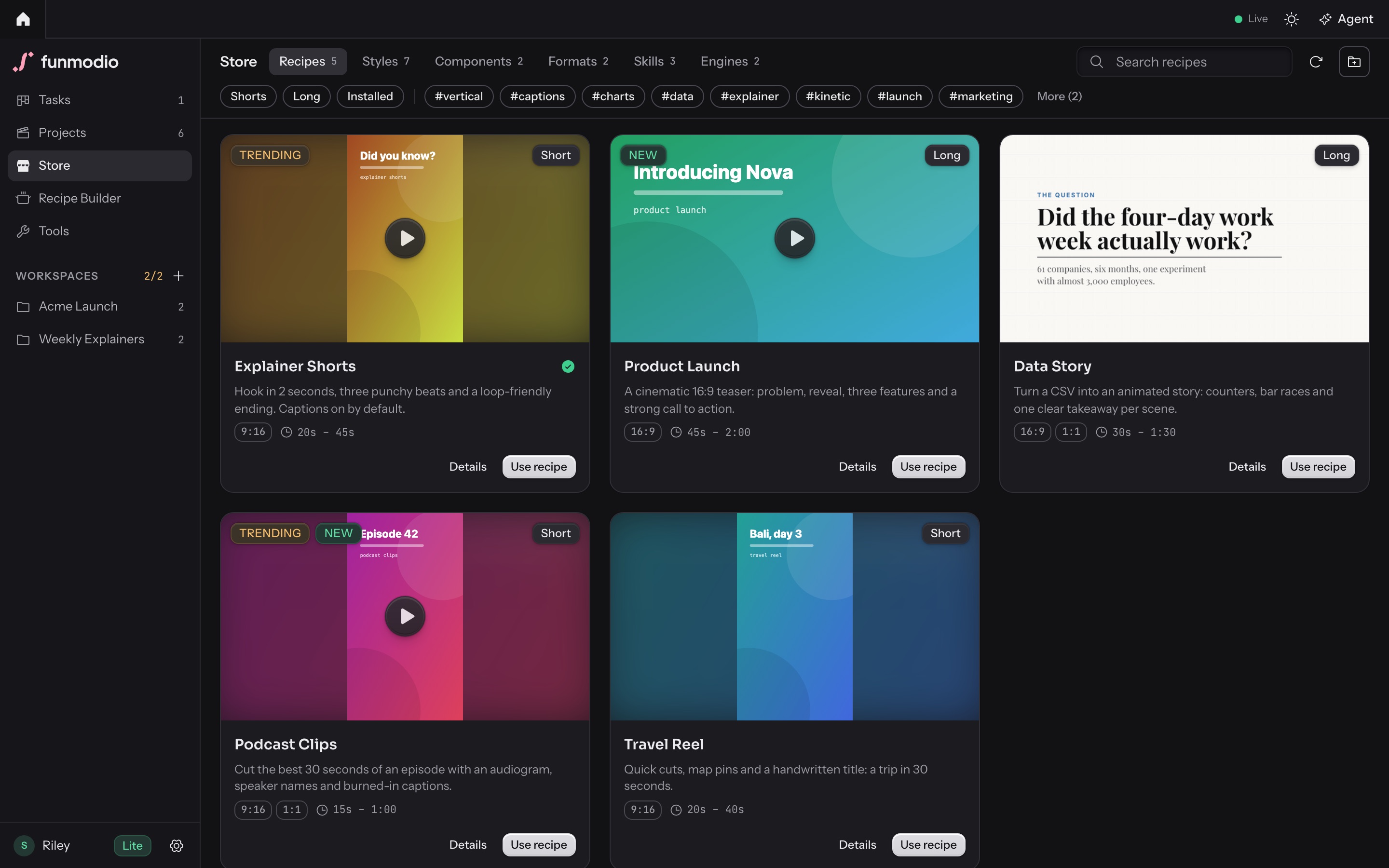
- The Store holds the styles and recipes a new video starts from.
Workspaces
One workspace per channel. Every video starts already knowing it.
A workspace is a folder for a YouTube channel, a brand or a client. Each project you create inside it inherits the brief and the brand rules, so you stop pasting the same context into every new video.
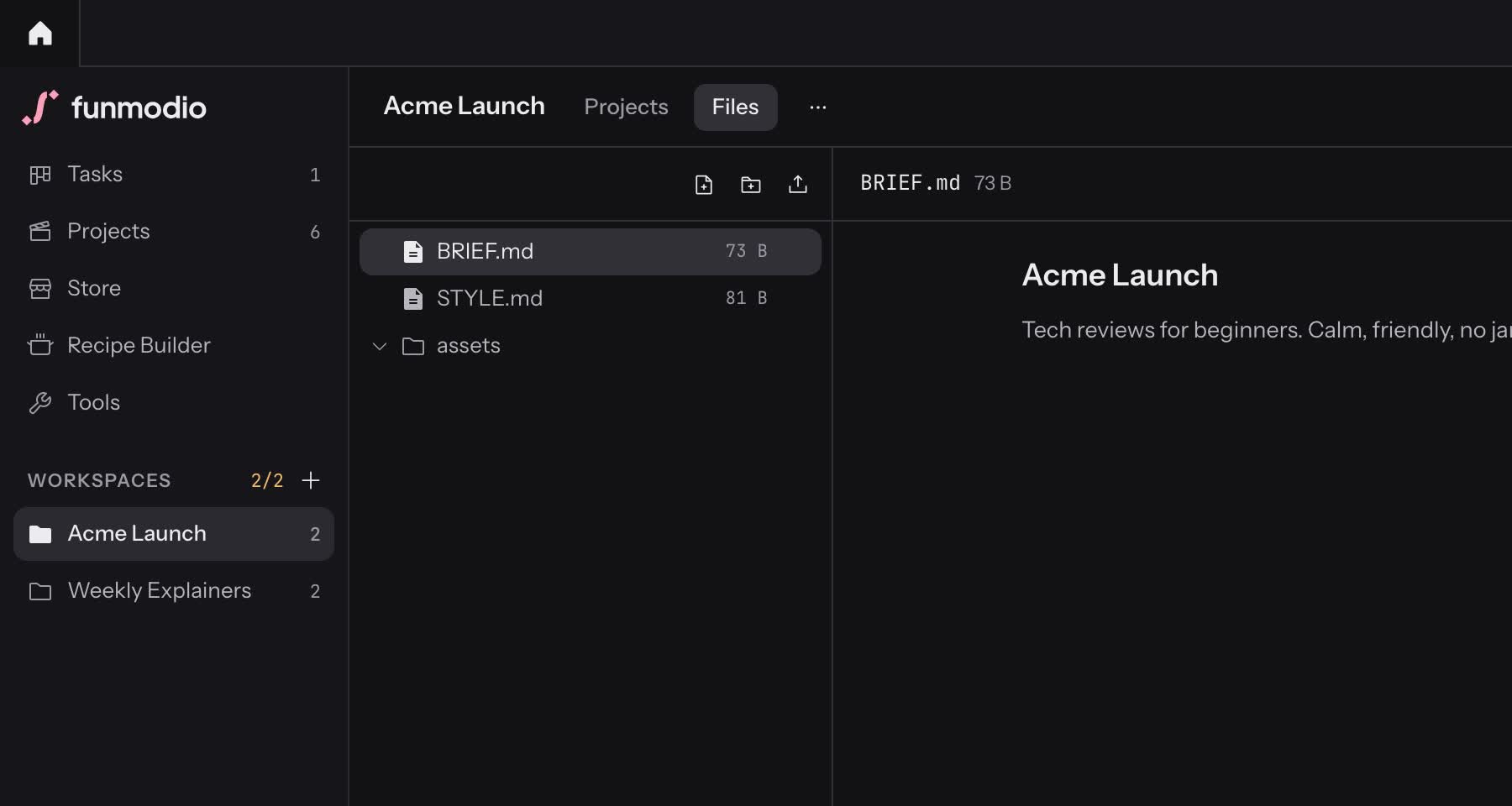
- BRIEF.md
- Audience, goals, topics, do and don’t.
- STYLE.md
- Colors, fonts, logo rules, voice, intro and outro.
- assets/
- Logo, fonts, music, bumpers.
- notes, scripts, references
- Anything else the channel needs to remember.
- Change a brand color once and the next render of every project in the workspace picks it up.
- Finished videos keep their own copy of the assets, so an old cut never changes under you.
- Upload or drop files into assets/; an agent can read and edit them too.
- Your plan sets how many workspaces you can keep. Existing ones always keep working.
Store
Don’t start from a blank prompt. Start from a recipe.
The Store is the shelf of ready-made parts, updated continuously: 50+ styles, 20+ recipes, 25+ skills, plus components and formats. Anyone can browse it. Installing needs a plan.
- recipe
A starting point: engine, style, format, components, skills and the beats of the video.
- style
The look and motion of a whole video: type, palette, pacing.
- component
One scene or element: a map, a chart, captions, a lower third, a transition, a title.
- format
Aspect ratio and safe zones, such as Shorts at 9:16.
- skill
Know-how your agent reads before it writes: motion rules, caption handling, 3D.
- engine
The renderer a project runs on.
- versions
Packages use semantic versions and a latest tag that follows new releases, so you can take an update or stay on the version a channel was built with.
Styles
A style for every kind of video. Pick it, don’t describe it.
A style is the type, palette and motion rules for a whole video. The agent reads it before it writes a scene, so the cut keeps one voice from the first frame to the last. These six are a sample of the 50+ in the Store.
-
Documentary Film
-
Newsroom Broadcast
-
Handwritten Notebook
-
Brutalist Web
-
Cozy Illustration
-
Kinetic Geometry
Style previews as they ship in the Funmodio Store.
Recipes in action
Pick a recipe, name the video. The agent fills in the beats.
- 01
Pick the recipe
Story Time Shorts: a first-person short shot on tape, with a camcorder overlay and boxed subtitles.
- 02
Name the video
In the workspace of the channel it is for, say what it is about: “The worst sleepover ever”.
- 03
The agent fills the beats
The project is created with the engine, style, format and caption component already chosen. Your agent writes the five beats, 31 seconds in all.
funmodio.json, shortened
{
  "id": "funmodio/story-time-shorts",
  "kind": "recipe",
  "title": "Story Time Shorts",
  "formats": ["9:16"],
  "duration": { "min": 22, "max": 50 },
  "recipe": {
    "engine": "hyperframes",
    "style": "funmodio/vhs-camcorder",
    "format": "funmodio/shorts-9x16",
    "components": ["hyperframes/caption-pill-karaoke"],
    "structure": [
      { "beat": "hook", "sec": 3 },
      { "beat": "setup", "sec": 7 },
      { "beat": "conflict", "sec": 8 },
      { "beat": "twist", "sec": 7 },
      { "beat": "ending", "sec": 6 }
    ]
  }
} Ways to use
Use it from the app, or from the agent you already have.
Funmodio is also an MCP server with more than thirty tools: projects, files, renders, notes, tasks. Anything that speaks MCP can drive it. Bring your own agent and subscription: Funmodio never sits between you and the model.
Desktop app
The Studio on macOS, Windows or Linux: workspaces, the Store, previews and review in one window.
Claude Desktop
Double-click Funmodio.mcpb and press Install. It has no file tools, so Funmodio brings its own.
Claude Code
One line in any terminal. --scope user makes it available in every folder.
claude mcp add --scope user funmodio -- npx funmodio mcpCodex, Cursor, any stdio client
Register the bridge as an MCP server. It finds the running app or starts its own daemon.
npx funmodio mcpURL-only clients
Antigravity and others that only take a URL talk to the daemon over Streamable HTTP.
http://127.0.0.1:47310/mcpInside the app
Start an agent session in Funmodio itself, with your own Claude Code sign-in. Sessions share a task board, so two agents never edit the same project at once.
The npm package and the .mcpb bundle ship with the first release.
Review
Review notes your agent can read.
When a video is ready, leave notes tied to a time range or a spot on the frame. The agent reads them over MCP, fixes the scene and resolves them.
- Ranges, not vague timestamps
- Drag across 0:07–0:09 on the timeline, or stop on one frame. The note is tied to exactly that stretch.
- The agent sees what you saw
- When it reads your notes it also gets the frame each one was left on, so it fixes the right thing.
| At | Who | What | State |
|---|---|---|---|
| 0:00.8–0:02.5 | You | The logo comes in too late. It should be on screen before the first beat. | Open |
| Agent | Moved the logo reveal to frame 12 and shortened the fade to 8 frames. | Replied | |
| v4 | Agent | Rendered draft v4 and checked the contact sheet. | Resolved |
Engines and local
Rendered on your computer, by the engine that fits.
- Renders
- On your computer, with headless Chrome and ffmpeg. No cloud queue, no upload.
- Projects
- Real files in ~/.funmodio, one folder per project. Open them in any editor.
- Runtimes
- Node and Chrome are fetched once into the data folder. You install ffmpeg yourself.
- Account
- You sign in to use the app. The account knows your plan and devices, not your videos.
FAQ
Questions.
Can I use it for several YouTube channels?
That is what workspaces are for. Make one per channel, brand or client, put the brief, style notes and logo in it, and every project inside inherits them. How many workspaces you can keep depends on your plan.
Do I need to bring my own agent?
To have an agent write the scenes, yes: Claude Desktop, Claude Code, Codex, Cursor or any MCP client, or an agent session inside the app. You pay your own model provider. Funmodio never sits between you and the model.
What can I install on each plan?
Anyone can browse the Store. Installing styles, recipes, components and the rest needs a plan, and plans differ in how many workspaces, styles, recipes and components you can keep.
Do I need an account?
Yes. You sign in once in the desktop app. Projects and renders stay on your computer; the account is for your plan and your devices.
Is it open source?
No. Funmodio is proprietary software by Lunar Axel. The engines it runs keep their own licences.
Why is Remotion optional?
Remotion is not open source and companies of four or more people need a paid licence. Funmodio never bundles it: you install it from the Store after accepting its licence.
When can I download it?
The first public release is being prepared for macOS, Windows and Linux. The download buttons on this page will point at it the day it ships.
Download
Download Funmodio.
One desktop app with the Studio, the daemon and the engines inside. It is not released yet; these links go live with the first build.
macOS
- Apple silicon Funmodio-macos-arm64.dmgSoon
- Intel Funmodio-macos-x64.dmgSoon
Windows
- Installer (x64) Funmodio-windows-x64-setup.exeSoon
- MSI (x64) Funmodio-windows-x64.msiSoon
Linux
- AppImage Funmodio-linux-x86_64.AppImageSoon
- Debian / Ubuntu Funmodio-linux-amd64.debSoon
- Fedora / RHEL Funmodio-linux-x86_64.rpmSoon